Did you know that when you search for a coffee shop, a plumber, or a bookstore on Google, the first results you see are almost always related to well-ranked local businesses? This is no coincidence; it's the result of a powerful tool called Google Business Profile. If you're not familiar with it yet, brace yourself because this guide can radically change the way your customers find you.
The Business Profile That Google Loves (and Your Customers Do Too)
Why is Google Business Profile revolutionizing local businesses?
Imagine being able to showcase your business right when someone searches for it near you, with up-to-date information, eye-catching photos, and positive reviews that instantly build trust. That's exactly what Google Business Profile does. This platform not only makes you easier to discover on Google Maps, but it also transforms the way you interact with your potential customers, creating a direct connection from the initial search.
Furthermore, as more users turn to their mobile devices to make immediate decisions about where to shop or which business to visit, being visible on Google Maps with accurate and engaging information has never been more crucial. Failing to take advantage of this tool literally means missing out on opportunities every day.
Google My Business is now Google Business Profile: What's changed?
You may have heard of Google My Business, but it recently changed its name to Google Business Profile. This change isn't just cosmetic; it reflects an evolution toward a more intuitive, accessible, and powerful platform. You can now manage your profile directly from Google Search and Google Maps without necessarily having to access a separate app.
Google's goal is to make it easy for any business owner, regardless of their technical skills, to manage their online presence, updating their information in real time and maintaining direct contact with their customers.
What Is a Google Business Profile? A Simple and Clear Definition
Google Business Profile: What it is and what it's for
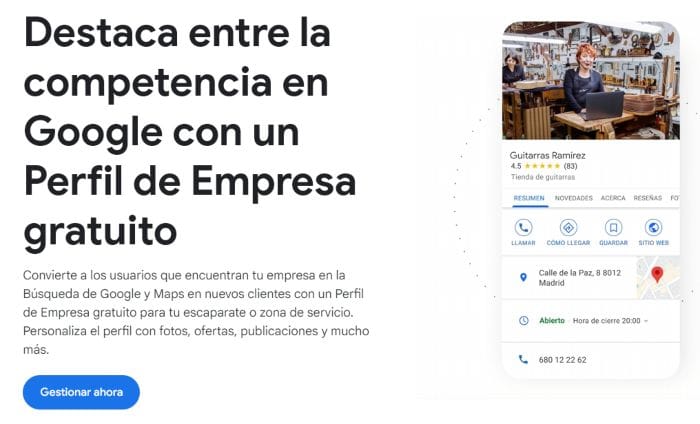
Google Business Profile is a free tool created by Google that allows local businesses to manage their appearance in Google searches and maps. In other words, when someone searches for your product or service near your location, a detailed listing with your name, address, phone number, hours, reviews, and more will appear directly on Google.
This listing acts as a digital business card that makes it easy for potential customers to contact you, visit your website, or physically visit your business.
How Google My Business has evolved from today
Google Business Profile has evolved tremendously since its early days as Google My Business. Previously, managing everything from a separate dashboard was necessary, which many found cumbersome. Today, however, you can update your information directly from the search engine or Google Maps, greatly simplifying the process and reducing barriers for those who manage multiple tasks on a daily basis.
Key differences between Google Business Profile and Google Ads
It's essential not to confuse Google Business Profile with Google Ads. Google Ads is paid advertising, while Google Business Profile is a free tool that optimizes your local visibility organically. Using them together, however, can multiply your reach exponentially.
Local visibility and how to get your business listed on Google Maps
One of the most common questions is how to get your business listed on Google Maps. With Google Business Profile, you can do just that, showing up right when someone nearby searches for products or services. services like yours. This generates physical and online traffic, increasing your sales and local visibility.
Direct interaction with your customers: reviews, questions, and messages
Google Business Profile not only showcases your business: it also allows users to leave reviews, ask questions directly through Google, and send you private messages. This creates two-way communication that helps build lasting relationships and fosters trust among potential customers.
Easily control how your business appears on Google
Having control over how your business is displayed is key. Google Business Profile allows you to manage images, hours, contact information, and special offers in real time. This gives you the advantage of quickly adapting to any changes, always offering a positive experience to your customers.
How Does Google Business Profile Work?
How to make your business appear on Google Maps step by step
To get started, you just need to follow these basic steps:
Create your profile on Google Business Profile
Enter your basic information: name, address, phone number, business category
Verify your location with Google (usually by zip code)
Optimize your profile with photos, updated schedules, and frequent posts.
Verifying and publishing your business profile
Verifying your profile is key to avoiding duplicates or fraud. Verification is typically done through a postcard that Google sends to your address with a confirmation code. Once verified, your profile is automatically published, showing to users searching for businesses like yours.
What information should you include to stand out in local searches?
It's essential to include clear and complete information such as exact hours, a precise address, a phone number, an updated website, detailed services, recent photographs of the business's interior and exterior, and an attractive description of what you offer.
Advantages of Using Google Business Profile in Your Local Strategy
Increase the visibility of your business compared to nearby competitors
A well-optimized profile will help you stand out from your closest competitors, attracting customers who might have chosen another business simply out of lack of knowledge.
Impacts the local SEO positioning of your website
Google Business Profile positively influences your positioning Local SEO, boosting your visibility in geolocalized searches.
Make it easy for your customers to contact you and learn about your services
Complete and up-to-date information reduces uncertainty and greatly facilitates the immediate purchasing decision.
Get real statistics on how users find your business
Google provides accurate statistics on visits, website clicks, phone calls, and more, allowing you to continually adjust your strategy.
How to Create and Optimize Your Google Business Profile
Step-by-step guide: How to get your business listed on Google Maps
Creating a Google Business Profile doesn't require any technical knowledge. However, doing it right from the start makes a huge difference in the visibility and results you'll achieve. Here are the key steps:
Access Google Business Profile: Go to google.com/business and click on “Manage now”.
Enter your company name: If it's already listed, you can claim it. If not, create one from scratch.
Select your category: Be specific. Instead of “Store,” choose “Women's Clothing Store” or “Artisan Bakery.”
Add your physical location: This is vital to appear on Google Maps.
Please indicate if you offer home delivery services: If so, you'll be able to expand your business's reach.
Add contact information: Telephone, website and opening hours.
Verify your profile: Google will send you a code by mail (although sometimes it allows you to do it by phone or email).
Advanced tips to optimize your profile: images, categories, and schedules
Once your profile is created, the next step is optimization. Many businesses leave it incomplete, which prevents them from standing out. Here are some key points:
Add real and attractive images: Facade, interior, products, human team… humanize your brand!
Select all categories that apply: You can add secondary categories to expand your reach.
Clear and up-to-date schedules: Also includes holidays or exceptional closures.
Add attributes: For example, if you have WiFi, wheelchair accessibility, contactless payments, etc.
Post updates and offers: Use the “Posts” section as a mini promotional blog.
Common mistakes to avoid when setting up your profile
Even seemingly well-configured profiles can fall into errors that limit their effectiveness. Avoid the following:
Leave your profile unverified: You won't appear on Maps until you complete this step.
Posting information that contradicts your website or social media accounts.
Do not respond to reviews (positive or negative).
Do not add images (or use blurry or generic images).
Provide an address that does not match the actual location of the business.
Google Business Profile and Local SEO: A Perfect Match
How does Google Business Profile influence your company's local SEO?
Google Business Profile is a key piece of the Local SEOWhy? Because it helps Google understand:
Where is your business (geolocation).
What you offer (categories, services, descriptions).
How your customers interact with you (reviews, clicks, calls, visits).
The more active your profile is, the more positive signals it sends to Google. And that... translates into more visibility in local searches.
Strategies to boost your local ranking from Google Maps
Some effective strategies:
✅ Ask your clients for reviews after each service.
✅ Publish regularly (offers, events, news).
✅ Use local keywords in your descriptions (“boiler repair in Barcelona”).
✅ Include images with descriptive and geolocated ALT tags.
Integrate Google Business Profile into your overall SEO strategy
This isn't a standalone tool. Your Google Business Profile must be aligned with:
Your website (same address, phone number and descriptions).
Manage and respond to reviews: turn comments into loyal customers
Google reviews are one of the most powerful trust factors for a local business. It's not enough to have them: they must be managed with intelligence and empathy.
Respond to all reviews: Both positive and negative. Be grateful for the good and respond with solutions to the bad.
Customize your answer: No copying and pasting phrases like "Thank you for your comment." Make every customer feel heard.
Invite reviews: After a purchase or service, encourage them. A simple “Would you mind leaving us a review on Google?” works.
These posts appear directly on your listing when someone searches for your business. Take advantage of that space!
Take advantage of frequently asked questions to highlight key information
Google allows users to ask questions directly on your profile. And you, as the owner, can respond publicly and highlight valuable information.
The best part? You can also anticipate and write strategic questions and answers to help your future clients. Examples:
❓ Do you have a Bizum payment option?
❓ Do you ship outside the city?
❓ Do you have a gluten-free menu?
Common Mistakes That Can Harm Your Profile
Incomplete or outdated profiles: the great enemy of your visibility
An incomplete profile or one with incorrect information breeds distrust. And worse: Google could penalize you in terms of visibility. Make sure to: Update your hours, especially on holidays; Change your phone number if it changes; Review categories and descriptions regularly.
Ignoring or responding poorly to negative reviews
Nothing speaks worse of a business than seeing a negative review unanswered, or worse, with an aggressive or sarcastic response. Stay calm, respond professionally, and offer real solutions. Turning a bad review into an opportunity can build more trust than a good review.
Duplicate profiles or have contradictory information
Another common mistake is creating multiple profiles for the same business, or having inconsistent information across your website, social media, and Google Business Profile. Consistency is key. Unify names, addresses, hours, and phone numbers across all your digital channels.
Conclusion
Whether you have a physical store or provide services in your area, Google Business Profile is no longer an option: it's a necessityIt's the digital gateway to your business. Nowadays, when someone searches for what you offer, they expect to find all the information clearly presented: location, hours, reviews, photos, phone number... everything.
The good news is that you don't need to be a technician or invest large amounts. You just need a Google account, some attention to detail, and consistencyIt's free, visible, and effective. And it allows you to connect directly with people who are just one click (or one street) away from becoming your next customers.
So if you haven't done so yet, starts today:
Create your profile.
Add all key information.
Ride the local SEO wave.
And let your future customers find you effortlessly.
Because if you're not on Google Maps... it's like your shop window is always closed.
Have you already created your profile? Need help optimizing it? Let me know in the comments or write to me.
Table of Contents
Share me on your social media
Best Hosting in Spain
Best VPS in Spain
Maria de Mora
Digital Marketing is my life. I specialize in web design and development with WordPress and online advertising. I'm passionate about automation and AI, in all its wide variety. I'm constantly improving my skills and love learning new areas and improving my skills in familiar ones. Day after day, I help companies and freelancers take their businesses to the top. Want to be one of them? Get in touch with me. A lifelong student, I'm currently pursuing a Double Degree in Business Administration and Computer Engineering from the UOC.