Have you ever visited a blog, found an interesting article, but didn't know where to go next? No buttons took you to what you needed, everything seemed scattered, and then... you just left.
That, in part, is the fault of poor content architecture.
Blog content architecture isn't just a "technical" topic or a luxury only available on large websites. It's literally the foundation upon which an effective user experience and solid SEO positioning are built. And if you have a business blog—whether small, personal, or part of a larger project—you need that foundation to be well thought out.
Think of it like a house: you can have expensive furniture, hanging artwork, and even a robot that cleans the floor. But if the foundation is crooked, everything shakes. The same goes for a blog: you can write the best articles in the world, but if they're not well-connected, categorized, or accessible... they're lost.
This post is a practical, step-by-step guide to understanding What is web content architecture?, How to structure your business blog from scratch (or improve your existing one) and what mistakes to avoid if you want to scale in SEO and retain visitors.
Get ready to think like Google, but also like your ideal reader.
What Is Web Content Architecture?
Clear, human and non-technical definition
Content architecture is, in a nutshell, the way you organize, structure, and connect information within your website. It's not a visual map, it's not just the menu... it's EVERYTHING that defines how the topics are grouped, how the user navigates y How Google understands the hierarchy of your pages.
It's deciding whether your content is arranged like neatly arranged books on a shelf... or lying on the floor in unlabeled piles.
It's what makes your blog easy to navigate or a maze of lost clicks.
And yes, although it sounds "abstract," it has very concrete implications: from how you name your categories, to how you create internal links, how you build URLs, how you structure your articles, or how you decide which topics to create.
Why it is key in SEO, user experience and conversion
A good content architecture helps you:
Improve your SEOBecause Google understands everything better. It knows what's important, how one post relates to another, and you give it clues about the relevance of your content.
Make sure your users don't get lost: You help them navigate logically, keep reading, and spend more time on your site.
Convert more: Yes, because if the person finds what they need, they are more likely to end up contacting, purchasing, downloading, or whatever you want them to do.
Architecture is the glue that connects all your content efforts. You can have spectacular, well-optimized, carefully designed articles… but if they're not structured, if they don't support each other, if Google can't find them, or if readers can't follow them… they'll fall apart.
And here something else comes into play: It's not about having more content, but about having it better connected..
How Google (and your users) think
The role of the search engine and the reader in your blog structure
Sometimes we forget, but You don't make your blog just for Google or just for your users: you make it for both.And the interesting thing is that—although for different reasons—they both want the same thing: to quickly find what they're looking for.
🔍 GoogleAs a robot, it needs to understand your content hierarchy: what's most important, which pages are related to each other, how topics are grouped, and what path to follow to index everything correctly. If you make it difficult, it won't try.
🧑💻 Your user, as a human, wants intuitive navigation. If you come in looking for "how to do keyword research", don't accidentally end up reading about "content structure." Make sure the menus make sense. Make sure the posts are grouped logically. Don't have to "dig around in a search engine."
A clear architecture It's good for SEO and good for user experience., and that —guess— translates into more time on page, more clicks, more conversions.
Relationship between architecture, crawl budget and internal linking
Now let's get a little more technical, but without losing the tone:
crawl budget It's the time Google spends crawling your website. It's not infinite. If your architecture is messy, you have a thousand meaningless or duplicate URLs, or your internal linking isn't guiding well... Google runs out of time before it gets to the good stuff.
Internal linking It's your best ally for distributing authority among your content. When you link to one article from another, you're telling Google, "Hey, this is important," and you're also helping users dig deeper, connect ideas, and continue browsing.
A good architecture optimizes that crawl budget, facilitates positioning and reduces the effort that both the bot and the reader have to make.
💡 Golden tip: Every extra click someone has to make to get to what they're looking for... is one less chance they'll get it (and one less chance you'll convert).
How to Structure Your Business Blog Step by Step?
There are no magic templates that work for everyone here, but there are Universal principles that you can apply to any sectorIf you want your blog to be more than just a catch-all of articles, pay attention:
1. Define themes and strategic categories
Before you write a single word, you have to have clear about what you are going to talk about and how those topics are grouped. That is, your blog must have well thought-out categories: neither too many (chaos), nor so few that everything falls into "Miscellaneous".
🎯 Think of categories as large thematic pillars that support your content. Example in a marketing blog digital:
Email Marketing
💡 Tip: Don't invent categories just by intuition. Make a research keywordsReview the SERPs, see what your users are searching for, and define a maximum of four to eight categories.
2. Organize your content into logical levels (pillars, clusters, entries)
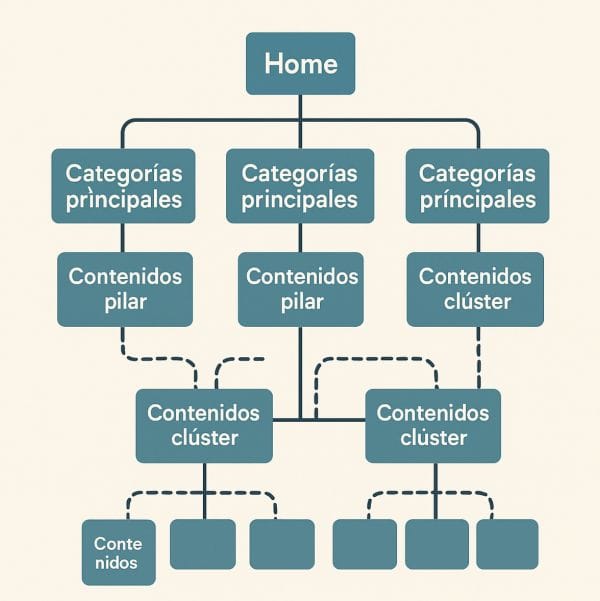
This is where a very effective SEO structure comes into play: pillar + cluster content model.
🔸 Pillar content: A complete mega guide on a central topic (e.g., “What is SEO and how does it work”).
🔹 clusters: More specific articles that expand on specific aspects of the main topic (e.g., “On-page SEO,” “Technical SEO,” “Keyword research,” etc.).
All of these clusters link to the pillar content… and to each other. This way, Google perfectly understands the semantic universe, and you improve the overall positioning of all posts.
3. Create a clear and consistent hierarchy in menus and URLs
It's not enough to have good content. If it's not well-placed, it's lost.
✅ Use clean and logical URLs:
❌ /post1234
✅ /seo/how-to-optimize-urls
✅ Use simple menus: Avoid endless drop-down menus. Group well. Make sure any category is at most 2 clicks from the home page.
✅ Add breadcrumb or breadcrumbs: They serve both users and Google to understand the path and the relationship between levels.
4. Use labels sparingly and meaningfully
Tags are not the same as categories. They are used to relate articles that share something in common, even if they are in different categories.
🔎 But be careful: Don't turn your blog into a hashtag soup. Use a few, well-thought-out, and clean names. Don't add 15 per post. And if you're not sure they'll be useful, it's best not to use them.
5. Design internal linking from the beginning
Internal linking is not improvised. planning from architecture.
Make sure each piece of content is relevant receive links from others.
Avoid “orphan” pages (without internal links).
Use anchor texts that describe the actual destination of the link.
And a simple trick: If you publish a new post, link to it from at least 2 old ones. (that are already positioned). This way, Google discovers it faster.
Tools and Resources to Plan Your Content Architecture
MindMeister or Miro – To organize ideas visually
Ideal if you're one of those people who think in "mind maps." You can draw the outline of pillars and clusters, group ideas, move categories... and have a full view of your blog's universe.
✅ Use nodes to represent categories
✅ Connect each cluster with its pillar content
✅ Add direct links to articles if they already exist
👉 Get a 10% discount on Miro from the link: Invitation to Miro
Notion or Google Sheets – For your keyword map and architecture
Perfect for having total control of:
Themes
Keywords
Proposed URLs
Assigned categories
Publication status
And planned internal links
💡 Tip: Create a “content hub” where everything is organized by priority, funnel stage, or search intent.
Screaming Frog – To audit your blog (if it's already published)
It's not just for analyzing technical SEO. It also helps you:
View the actual internal linking between pages
Identify orphaned content
Detect poorly structured hierarchies
Check for duplicate or non-hierarchical titles
📌 Important if your blog already has published content: It's better to fix the architecture now than wait until you have 200 messy posts.
WordPress Plugins – For Categorizing, Tagging, and Linking
Yoast SEO o Rank Math: allow you to see the internal link structure, breadcrumbs and taxonomies.
Internal link juicer: to create automatic internal links between related posts.
Custom Permalinks: to adjust your URLs and hierarchies in a clean and consistent way.
Other ideas you can use:
Lucidchart or Whimsical to draw the navigation flow
Trello or Asana If you work in a team and need to assign content tasks
Google Analytics + Search Console to see which categories and entries are performing and reorganize based on performance
✅ EXTRA: If you create a new blog from scratch, you can even structure all this first in Figma before layout, so that the content hierarchy is aligned with the visual design from the beginning.
Common mistakes
Poorly planning your blog's architecture is like building a house without plans: it may look beautiful on the outside, but inside, no one can find the bathroom. Let's look at the most common mistakes and how you can avoid them now.
Generic categories, without intention or focus
Many websites create categories like "Blog," "News," "Tips," "General," etc., that don't convey anything. They're empty tags that neither help Google understand the topic nor guide the reader.
🔴 Error: Categories created just because “you have to have them.”
✅ Solution: Create categories based on your business strategy and main keywords. For example, if you own a gardening store, consider "Indoor Plants," "Garden Tools," or "Urban Gardens."
Confusing and messy URLs
When you don't define a clear structure from the start, you end up with URLs like:
/blog/123456
/blog/noticia-importante-sobre-mi-negocio
/blog/actualizacion-productos-abril
Google hates this. So do your users.
✅ Use clean, descriptive URLs that are consistent with the blog's hierarchy. For example:
/blog/seo/como-hacer-un-keyword-research
/blog/marketing/contenido-seo-friendly
Also, if you're going to use subcategories, make sure they add value and don't become endless mazes.
Indiscriminate (and chaotic) use of labels
Another classic. You publish a post and add eight tags: “business,” “marketing,” “blog,” “online,” “strategy,” “digital,” “inspiration,” “8”… Sound familiar?
That doesn't help anyone. Not your SEO, not your readers. In the end, you have hundreds of tags with only one associated post. And that dilutes your entire structure.
✅ Solution: Use tags only if you are grouping together specific pieces of content. Otherwise, don't put them. Better 5 useful labels than 50 decorative ones.
Not planning internal linking from the beginning
If you don't think about this from the start, your blog becomes an island of disconnected posts. And you know: if Google doesn't find a connection between your content, it can't understand the depth of your topic... and it won't rank you.
✅ Define which content should link to which other content, based on your architecture's hierarchy. Use clear, relevant, and semantic anchor text.
Too much “floor” content offline
It's normal to publish single articles, sometimes for the moment, sometimes on impulse. But if 80% of your blog is like this, it becomes a library without shelves.
✅ Use a “pillar + cluster” strategy: create broad guides on a topic (the pillars) and develop more specific posts that complement them (the clusters), always well-linked.
Not building from the user's perspective
Sometimes we think too much about Google... and too little about the reader. Other times, it's the other way around. The ideal content architecture is right in the middle.
✅ Check: Does your menu guide the user? Do the categories make sense? Are there clear calls to action in your posts? If the answer is "sort of"… you know what to do.
Do not review or restructure over time
Architecture isn't something you create once and forget. Content grows. Your business evolves. And your blog must adapt to that.
✅ Review your architecture every 3-6 months. Eliminate cannibalized content, consolidate redundant content, and improve what no longer fits.
Real Benefits of Good Content Architecture
When you build a solid structure for your blog, you're not just creating "pretty organization." You're building a clear and fast track for Google and your users. And that... shows.
Better SEO positioning (for real)
Google needs to understand what topics you cover, how they relate to each other, what content is most important, and how you develop it. If your blog has a clear hierarchy and well-structured internal linking, you help it do its job. The result? Better indexing, greater topic relevance… and yes: higher rankings. For example, if you have a “SEO” category, and within it a core guide on “on-page SEO,” with several clustered articles linked from there (techniques, checklists, common mistakes…), Google sees it as comprehensive, reliable, and well-developed content.
More page views and lower bounce rate
A user who arrives at an article and easily finds related, well-organized, and engaging content… stays longer. Read more. Browse. Click.
This reduces bounce rate and increases time on page, two signals Google loves. And so do you, because it means your content is engaging and fulfilling its purpose.Higher conversion thanks to clear navigation
A well-designed website architecture guides the user like a skilled salesperson in a store. It not only provides what they're looking for but also shows them what they need next. Do you have a lead magnet? A service? A product? Make sure it appears at the right moment, within a logical structure, with well-placed calls to action. Because a well-structured blog also sells, even if it doesn't seem like its primary function.
Less cannibalization, more editorial control
Having a clear blog architecture prevents you from writing about the same thing three times without realizing it. It helps you distribute your keywords effectively, plan your topics, and keep your blog clean and strategic. And it also saves you time and headaches when you need to update or merge content.
FAQ
There is no magic number, but as a guide: between 3 and 7 main categories This is usually the healthiest approach for most business blogs. The goal is to cover your main topics without getting too scattered. If you have more than 10 categories, you may be creating content that's too loose or haven't organized it properly.
➡️ Think of your categories as the "departments" of your blog. Each one should address a specific user intent and group related content together, making sense for the business.
The short answer: subcategories yes, labels with a lot of thought (or don't use them).
Subcategories can help if you have a lot of content within a parent category. For example, if you have “Web Design” as your main category, you can use subcategories like “UX/UI,” “Trends,” or “WordPress.”
Labels, on the other hand, They are dangerous if you don't manage them well. They end up being pages with a single post, unstructured, duplicates, or little SEO value. If you decide to use them, do so with clear planning, and not as "individual words that sound good to me."

The architecture of content It's SEO in its purest form.
Affects:
How Google tracks and interprets you
Which internal links give strength to your pages
How much time users spend on your website
What thematic authority do you convey in your sector?
A well-thought-out architecture can help you rank faster and with fewer external links. Poor architecture, on the other hand, can drag you down without you even knowing it, even if you have good posts.
Yes. Or at least, as soon as possible. It's much easier to structure properly from the start than to reorganize a blog with 150 published articles. But if you're already in that situation... don't worry. You can always do an architecture audit, redirect whatever you need, retag whatever's unnecessary, and reorganize internal linking.
Think of your blog as a library. It doesn't matter if you have 20 books or 500: the important thing is that each one has its own shelf, its own category, and its own direct access.
Conclusion
Content architecture isn't just a pretty map of categories. It's the backbone of your content strategy, the path that guides your readers, and the way Google (and your potential customer) understands your business.
A well-structured blog not only ranks better: it converts more, retains better, and transmits a brand image solid, professional and reliable.
So if you ever thought SEO was all about keywords, links, or catchy titles... now you see, it's not. How you organize your content says as much about you as what you write.
Don't put it off. Because the sooner you do it, the easier it will be to grow, scale and position yourself as a benchmark.
➡️ Can we help you review your blog's architecture? Write to us, at Zudro Digital Media We perform a complete content and structure audit so that your website is not only beautiful... but effective.