Home » Digital Marketing and Advertising Blog » Marketing Dictionary » Basic Glossary to Help Your Clients Understand What You Do
Something that happens quite often when a company starts working with a digital marketing agency : someone mentions CTR, SEO, leads or conversions and suddenly a conversation that should be quite simple starts to resemble a NASA engineers' meeting.
And the curious thing is that many of those words don't have particularly complicated concepts behind them. Sometimes, all that happens is that we use English terms, acronyms, or technical expressions to describe things that could be perfectly explained in Spanish.
For example, when an agency says it wants to improve a campaign's CTR, it's simply talking about getting a higher percentage of people who see an ad to click on it. And when it proposes optimizing a landing page, it means improving a page designed to encourage a specific action, such as requesting a quote or buying a product.
It doesn't seem so complicated when someone explains it like that, does it?
The problem is that understanding the vocabulary of digital marketing is not just about learning definitions.
You also need to know what each concept means for your business, when it should matter to you, and what questions to ask when it appears in a budget, business proposal, or performance report.
That's why we've prepared this digital marketing glossary, designed especially for entrepreneurs, freelancers and professionals who work with digital agencies or providers, but who don't necessarily have to master their terminology.
Here you'll find the main terms in online marketing, SEO, web design, advertising, and analytics, explained with everyday examples and without unnecessary complications. Because you don't need to become an expert to understand what's being done with your website, your advertising, or your budget.
And, above all, because it's one thing to trust the professionals you hire and quite another to have to accept every decision without understanding what it means.
A digital marketing glossary is a collection of words, acronyms, and concepts commonly used in online marketing strategies . Its purpose is to help you understand what each term means and how it applies in real-world situations.
But this isn't meant to be an encyclopedic dictionary with two hundred definitions you'll probably never need. The idea is much more practical: to compile the vocabulary you might encounter in a meeting with an agency, while reviewing a campaign report, or when someone explains why your website needs certain changes.
For example, imagine you receive this comment:
"We are improving the SEO of the landing page to increase organic traffic and achieve more conversions."
If you're not familiar with the industry, it seems there are four distinct things you need to study before you can answer.
However, translated into normal language, it means:
"We are working to make this page appear better on Google, receive more visits from the search engine, and get more people to perform the action we want."
The second explanation is no less professional. It simply allows you to understand what is being done and for what purpose.
And that will be precisely our approach: to explain each concept by what it means, but also by what it implies for a business.
There are words you'll hear constantly, like SEO, conversion, lead, or hosting . Others appear mainly when analyzing campaigns, such as CPC, CTR, CPA, and ROAS. And some are more specific to technical projects, like caching, sitemap, or Google Tag Manager.
You don't need to memorize them all. The important thing is to recognize them when they appear and know what information they're giving you.
Furthermore, some concepts may seem similar, but they don't necessarily mean the same thing. A click isn't necessarily a conversion, a visit doesn't equal a customer, and a campaign generating a lot of traffic doesn't automatically mean it's performing well.
They are small differences on paper, but quite important when we are investing money.
That's why we've organized this digital marketing dictionary by work areas, instead of alphabetically. This way, you can directly look up terms related to what you're currently working on: SEO, web design, advertising, or analytics.
And if there's one idea worth keeping in mind throughout this reading, it's this: a metric or a technical term is only useful when you understand what it's telling you about your business.
Before discussing Google ranking, advertising campaigns, or web analytics, there are a number of basic digital marketing concepts worth understanding. These are the ones that constantly appear in budgets, meetings, and reports, regardless of whether you have an online store, a service company , or a small local business.
And the interesting thing is that many of them are connected. An ad can get clicks, those clicks can drive visitors to a page, and some of those visitors can eventually become customers. Each stage has its own name and metrics, but they're all part of the same process.
Let's translate that vocabulary into real-life situations.
Lead: when a visitor becomes a sales opportunity
A lead is a person who has shown interest in a product or service and has provided some form of contact or identification that allows a business relationship to begin.
Imagine you own a home renovation company . Someone visits your website, views several projects, and finally fills out a form to request a quote. That person becomes a lead: not yet a client, but a potential business opportunity.
And here's an important distinction: generating leads is not the same as acquiring customers. You might receive fifty quote requests and only close five deals. That's why, in addition to counting leads, it's important to understand their quality and how many of them ultimately become sales.
Conversion: the action we want to achieve
A conversion occurs when a user performs an action that we have defined as a goal. This could be making a purchase, requesting a quote, registering on a platform, or booking an appointment.
Conversion rates depend on the business and what we're measuring. For an online store, a purchase is usually the primary goal. For a clinic, it might be an appointment request. And for a service company, it could be the successful submission of a contact form.
The important thing is not to confuse any interaction with a valuable outcome. Someone pressing a button doesn't guarantee they've completed the action. A well-designed measurement must distinguish between the attempt and the result.
CTA: the invitation to take the next step
CTA stands for Call to Action. It's the element that encourages the visitor to do something specific.
For example:
Request a quote.
Book an appointment.
Download the guide.
Add to cart.
A CTA can be a button, a link, or even a phrase within the content. Its function is to guide the user to the next step, but it doesn't work miracles: if the proposal isn't interesting or the page generates distrust, changing "Submit" to "Request your quote now!" will hardly solve the problem.
Landing page: a page created to achieve a goal
A landing page is a page designed to receive visitors and guide them toward a specific action. It is widely used in advertising campaigns, product launches, and lead generation.
Let's go back to the renovation company. Instead of sending ads to the homepage, you can create a specific landing page about complete renovations in Granada, showcasing completed projects, services, advantages, and a form to request a quote.
The difference lies in the approach: a corporate website can present the entire company, while a landing page tries to reduce distractions and facilitate a specific decision.
However, not all pages a user lands on are necessarily landing pages designed to convert. In analytics, the term can also simply refer to the first page a person visits during a session. Context matters.
This brings us to the acronyms that often feature prominently in digital marketing reports. While they might seem intimidating at first, they actually answer some pretty reasonable questions: Are we meeting our objectives? How much are we spending? And what results are we getting?
KPI: the indicator that tells us if we are making progress
KPI stands for Key Performance Indicator. It is a metric chosen to assess whether we are getting closer to a goal.
For example, an online store might use the conversion rate as a KPI, while a service company might focus on the number of qualified business inquiries.
The key lies in the keyword. Having one hundred metrics available doesn't mean all one hundred are important. A KPI should help in decision-making, not simply fill a report with charts.
ROI: the return on investment
ROI stands for Return on Investment. It is used to calculate the return we have obtained relative to the cost of an investment.
For example, if we invest €1.000 in a stock and obtain a net attributable profit of €300 after considering the corresponding costs, the ROI would be 30%.
It is a broader metric than advertising results because it seeks to relate profit to investment made.
ROAS: how much we earn for every euro invested in advertising
ROAS stands for Return on Ad Spend. It relates the revenue attributed to a campaign to the advertising expenditure.
If we invest €500 in ads and get €2.000 in sales attributed to those ads, we get a ROAS of 4, or 400%.
Does this mean we've earned €1.500? Not necessarily. We still need to consider the cost of products, shipping, staff, and other expenses. A high ROAS doesn't guarantee a profitable campaign.
This difference between ROI and ROAS is one of the most worthwhile to understand when working with online advertising.
CPC: how much each click costs
CPC stands for Cost Per Click. It tells us how much we pay on average for each click received in a campaign.
If we spend €100 and get 200 clicks, the average CPC will be €0,50.
A low CPC might seem like good news, but it isn't always. If the clicks come from people who aren't interested in buying, we'll be paying little for visits that probably won't yield any results.
CTR: what percentage of people click
CTR stands for Click-Through Rate, and expresses the relationship between clicks and impressions.
Imagine an ad is shown 10.000 times and receives 300 clicks. Its CTR will be 3%.
This metric helps assess whether an ad or result is attractive and relevant to viewers. However, it shouldn't be interpreted in isolation: an ad can get many clicks thanks to an eye-catching message and then not generate a single sale.
Therefore, when an agency talks about improving CTR, it should be clear that the ultimate goal is not to get clicks for the sake of getting them, but to attract the right people.
Term | What does it measure? | Question that answers |
|---|---|---|
Lead | business opportunities | How many interested people have we gotten? |
Conversion | Target actions completed | How many have done what we were looking for? |
KPI | Performance against a target | Are we getting results? |
ROI | Return on investment | Is it paying off for us financially? |
ROAS | Revenue from advertising expenditure | How much do we sell for every euro spent on ads? |
CPC | Average cost per click | How much do we pay for each click? |
CTR | Click-through rate (CTR) | How many times do they click when they see us? |
SEO is one of those disciplines that seems much more complicated when explained with acronyms. An agency might talk about keywords, SERPs, backlinks, or indexing and assume everyone knows what they mean. But behind these terms are some pretty simple questions: Can people find our website on Google? What searches does it appear for? And what can we improve to get relevant traffic?
In this part of our digital marketing glossary we will translate the SEO concepts that most often appear in audits, budgets and positioning reports.
Keyword: what a person searches for on Google
A keyword is a word or phrase that we use to represent a search relevant to our content or business.
For example, a renovation company in Granada might want to position itself for expressions such as "comprehensive renovations Granada" or "home renovation company".
But here's an important distinction: a keyword isn't a word we should repeat twenty times to convince Google. It's a clue about what the user needs to find.
Therefore, when an agency conducts a keyword study (or research keywords), should not be limited to compiling terms with high search volume. It should also assess which terms make sense for the business and what type of content the person performing each search expects to find.
Search intent: what the user really wants to achieve
Search intent is the goal behind a query.
Searching for "what is a complete renovation" is not the same as searching for "price of a complete renovation in Granada." The first person probably wants to find out more; the second is much closer to hiring someone or requesting a quote.
Understanding this difference allows you to create content tailored to each need. It's not very useful to rank a commercial page for a purely informational search if the visitor doesn't find the explanation they were expecting.
In SEO, correctly answering the search intent is often more important than exactly repeating the words used in the query.
SERP: Google's search results page
SERP stands for Search Engine Results Page. It is, simply put, the page that Google displays after you perform a search.
And no, it's no longer just ten blue links. Depending on the query, it can include organic results, ads, maps, images, videos, featured snippets, or AI-generated answers.
When an agency says it is analyzing SERPs, it is usually studying what results Google displays and what content format seems to best answer that search.
For example, if you search for "plumber Granada" and mostly business listings and maps appear, that information helps you decide which one to look for. local visibility strategy That makes more sense.
Organic positioning: appearing without paying for each click
Organic positioning consists of gaining visibility in non-advertising search engine results through an SEO strategy.
This doesn't mean it's free. Creating content, improving a website, resolving technical issues, and working on SEO require time and resources. The difference is that we don't pay Google directly for each organic click received, as is the case with certain advertising models.
Nor does it mean that an agency can guarantee the top position. The ranking depends on numerous factors, including competition and the relevance of each result to the query.
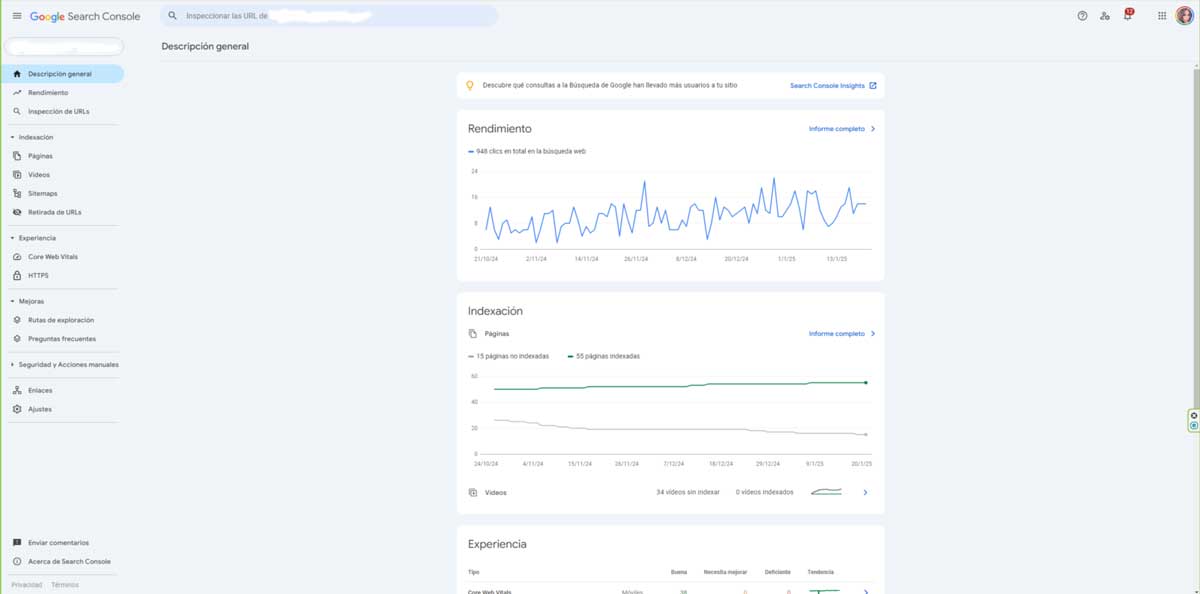
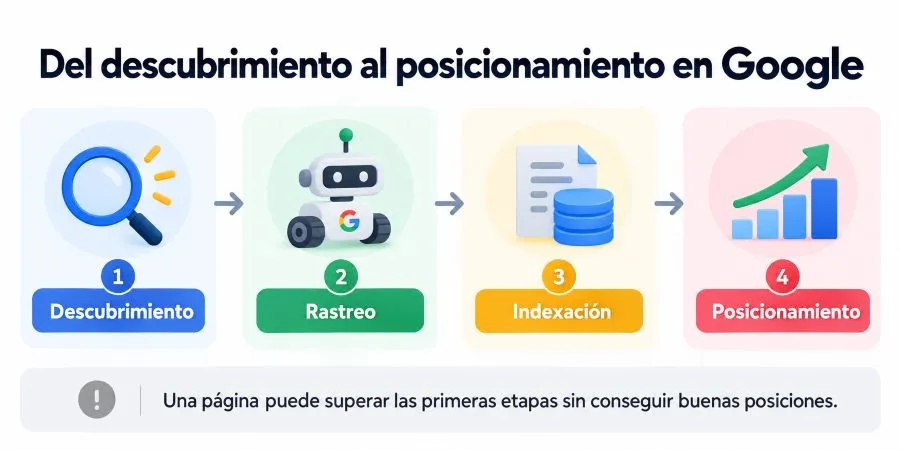
Indexing: Google adding a page to its index
For a page to appear in Google's search results, it must typically be discovered, crawled, and deemed suitable for indexing.
Indexing is the process by which Google analyzes and stores information about a page in its index.
Here it is important to distinguish three concepts that are often confused:
Crawling: Google discovers a URL and attempts to access it.
Indexing: analyzes the page and can add it to its index.
Positioning: decide when and where to show it for specific searches.
Just because a page is indexed doesn't guarantee it will appear in the top search results. It doesn't even guarantee it will be displayed for all queries related to its content.
That's why, when someone says "my website doesn't appear on Google", the first thing to do is find out if there is an indexing problem or simply a visibility problem.
Sitemap: a map that helps discover the pages
A sitemap is a file, usually in XML format, that provides information about the URLs we want to make known to search engines.
This can be especially useful on large websites, sites that change frequently, or projects where some pages are difficult to discover through internal links.
However, having a sitemap does not guarantee that Google will index all the included pages. It's a discovery aid, not a command the search engine is obligated to follow.
In WordPress, for example, many SEO tools automatically generate and update this file.
Backlink: a link from another website to ours
A backlink is a link that we receive from an external page.
Imagine a local newspaper publishes an article about a company and includes a link to its website. That link is a backlink.
In SEO, links can help Google discover pages and act as signals related to the relevance of content. But not all links are created equal: context, origin, and the natural way in which they were acquired all matter.
Getting a hundred links from irrelevant websites is not necessarily better than receiving a few editorial links from pages related to our industry.
Authority: a way of talking about a website's reputation
Here we have one of the SEO terms that generates the most misunderstandings.
When an agency talks about a domain's authority, it might be referring generally to its reputation, recognition, or backlink profile. It might also be referring to metrics created by SEO tools, such as Moz's Domain Authority or Semrush's Authority Score.
And there is a fundamental difference: these metrics are not official Google scores or ranking factors used directly by the search engine.
They serve as indicative guides for analyzing and comparing websites, but they should not become the sole objective of an SEO strategy.
Ultimately, what matters most is making our website technically accessible, offering useful content, and being relevant to the people we want to attract.
When a company commissions a website, it starts hearing terms like hosting, CMS, responsive design, and caching. And it's quite common for them all to end up lumped together, even though they refer to very different things.
In this part of our digital marketing glossary, we'll clarify the main web design and development terms, especially those that appear in budgets, maintenance tasks, and conversations about how a website works.
Because knowing you need a professional website is one thing, but understanding what you're hiring, what elements are essential, and which ones require maintenance is another.
Domain: Your business's internet address
The domain is the name we use to access a website, such as zudro.esIt is the address that we type into the browser and that we can also use to create corporate email accounts.
It is usually registered for renewable periods and its price depends, among other factors, on the chosen extension: .es, .com, .net, etc.
An important distinction: registering a domain does not mean you have a website. You have simply registered an address that you can later connect to the corresponding hosting.
Hosting: the space where your website is hosted
Web hosting is the service that allows you to store and serve the files, databases, and other resources necessary for a website to function on the Internet.
We can explain it with a simple comparison: if the domain is the address of your business, the hosting is the space where the website is installed.
But not all hosting providers offer the same thing. There are differences in performance, resources, security, backups, technical support, and capacity to handle visitors.
Therefore, when an agency suggests changing your hosting provider, they aren't necessarily trying to sell you something more expensive. They may be looking to solve real problems with speed, stability, or technical limitations.
And the reverse is also true: paying for very expensive hosting does not automatically turn a poorly optimized website into a fast page.
CMS: the system you use to manage content
CMS stands for Content Management System. It's the software that allows you to manage a website without having to manually schedule each post or change.
WordPress is one of the best-known examples.
Thanks to a CMS you can publish articles, modify texts, manage images or add pages from an administration panel.
However, having WordPress doesn't mean you can modify absolutely any element without technical knowledge. Depending on how the website was developed, some functions may require programming, specific configuration, or professional intervention.
That's why it's important to ask which parts you can manage independently when you hire a website.
Responsive: a website that adapts to different screen sizes
Responsive design allows a website to adapt its layout to different screen sizes, such as computers, tablets, and mobile phones.
It's not simply a matter of shrinking a desktop page to fit a phone screen. Elements need to be rearranged so that text is readable, buttons are easy to tap, and navigation still makes sense.
For example, a horizontal menu with eight options can become a drop-down menu on mobile. And a three-column layout can display the items one below the other.
A website can look fine on a computer but be frustratingly unresponsive on a phone. That's why responsive design shouldn't be treated as an extra, but as an essential part of any modern web project.
Cache: storing resources so you don't have to load them constantly
The cache is a mechanism that allows certain resources or answers to be temporarily stored in order to speed up subsequent access to them.
A website can use different types of cache: browser cache, server cache, WordPress cache, or content delivery network cache.
Have you ever modified an image on your website, saved the changes, and still seen the previous version? Sometimes, the culprit is a caching system that's still displaying the stored resource.
Caching can significantly improve performance, but it needs to be configured correctly. If it retains outdated content or interferes with dynamic pages, it can also cause problems.
UX: how the experience of using your website feels and works
UX stands for User Experience.
It is a broad concept that encompasses how a person interacts with a page: whether they easily find what they are looking for, understand the information, can complete a purchase without difficulty, or can contact the company without having to go through five menus.
Imagine a beautiful online store where the checkout button is hidden and the form asks for fifteen unnecessary details.
Visually it can be very good.
But the user experience is probably pretty bad.
UX is not just about making a website look pretty. It's about making it easy, understandable, and satisfying to use.
UI: the visual elements with which the user interacts
UI stands for User Interface.
It refers to the visual and interactive elements that are part of a website or application: buttons, menus, form fields, icons, colors, fonts and distribution of components.
UX and UI are related, but they are not the same.
UI deals with how the interface is presented and organized. UX analyzes the complete experience of using it.
We could summarize it like this: a button can have an excellent visual design, but if nobody understands what will happen when it is pressed, there is a user experience problem.
Loading speed: how long it takes your website to become available and respond
Page load speed describes various aspects of the time a page needs to display its content and allow interaction.
And here's an important detail: there isn't a single number that fully explains whether a website is fast.
Google uses metrics such as Core Web Vitals to evaluate specific aspects of the real-world experience:
LCP (Largest Contentful Paint) : measures when the largest main content element appears in the visible area.
INP (Interaction to Next Paint) : evaluates the page's responsiveness to interactions.
CLS (Cumulative Layout Shift) : measures unexpected changes in the position of elements.
A website can load visually quite quickly and yet be unresponsive when the user tries to interact with it. It can also display content quickly but move buttons and images while it finishes loading.
Therefore, when someone tells you that a website's speed needs to be optimized, it's advisable to ask what specific problem has been detected and how it affects the user.
It's not just about getting a nice score on PageSpeed Insights. It's about making the website work better for the people who visit it.
Digital advertising has the curious ability to turn a simple question — "Are my ads working?" — into a conversation full of acronyms, percentages, and English terms.
And while metrics are necessary, it's important to first understand how a campaign works: who we want to reach, where our ad appears, how much we are willing to pay, and what we hope to achieve.
In this part of the digital marketing glossary, we will focus on the online advertising concepts that most often appear in agency proposals and in Google Ads or Meta Ads reports, without repeating the indicators that we have already explained.
SEM: search engine advertising
SEM stands for Search Engine Marketing. Although it can broadly refer to marketing on search engines, in common agency usage it is primarily used to refer to paid advertising on search engines, such as Google Ads.
For example, a dental clinic can create ads to appear when someone searches for "dentist in Granada." If the campaign is well-targeted, it will attract people who are already looking for that service.
The difference with SEO is important: through organic positioning we work to gain visibility in the natural results; through search engine advertising we can compete for sponsored spaces under an auction system.
However, paying doesn't guarantee you'll always appear in the top position. Google also considers factors such as ad quality and relevance, landing page experience, and existing competition.
Remarketing: reconnecting with those who have already shown interest
Remarketing is an advertising strategy that allows you to re-engage, when you have the necessary data and permissions, people who have already interacted with your business.
Imagine someone visits an online store, looks at several bicycles, and leaves without buying anything. They might later receive advertising related to the products they were viewing.
The idea is simple: we're not talking about winning over someone completely unknown, but about recapturing an opportunity that has already shown some interest.
But remarketing requires careful consideration. Targeting the same person for weeks with the same ad can have the opposite effect. It's also essential to respect applicable privacy and consent guidelines.
Segmentation: deciding who we want to show the ads to
Segmentation involves defining which people, characteristics, or contexts we want to reach with an advertising campaign.
We can use geographical criteria, interests, behaviors, demographic data, or signals related to purchase intent, depending on the platform.
For example, a face-to-face English academy located in Granada probably doesn't need to advertise throughout Spain. It might be more effective to focus investment on its local area and tailor its messaging to the specific type of students it wants to attract.
Segmentation helps to make better use of the budget, although an overly restricted audience can also limit reach and make it difficult to learn from campaigns.
Audience: the group of people we are addressing
The audience is the group of users we want to reach or analyze in a campaign.
It is related to segmentation, but it does not mean exactly the same thing: segmentation is the process of defining criteria, while the audience is the resulting or selected set.
For example, we can work with audiences of people who have visited our website, existing customers, or users with specific interests.
A particularly useful distinction is between cold, warm, and hot audiences. Cold audiences are barely familiar with the business; warm audiences have already had some contact; and hot audiences have shown clearer signs of interest or purchase intent.
Not everyone needs to hear the same advertising message.
CPA: how much does it cost us to acquire a share
CPA stands for Cost Per Action or Cost Per Acquisition, depending on the context. In campaign reports, it's typically used to express how much it costs to achieve a specific conversion or acquisition.
Imagine you invest €300 in advertising and receive 15 valid quote requests. Your average cost per action would be €20.
It's a particularly useful metric for comparing results, but there's a catch: we must correctly define what action we're counting. Paying €20 for a completed form is not the same as paying €20 for a customer who ultimately makes a purchase.
Therefore, a low CPA doesn't always equate to a profitable campaign. The quality of conversions matters just as much as their quantity.
Bidding: how much are we willing to pay to compete
Bidding is involved in the auction systems used by advertising platforms to decide which ads can be displayed.
In manual campaigns we can establish certain employment offers or limits, while automated strategies use algorithms to adjust bids according to objectives and available signals.
For example, Google Ads allows you to use strategies aimed at maximizing conversions, achieving a target CPA, or reaching a specific ROAS.
But it's worth debunking a common misconception: the highest bidder doesn't always win. The relevance and quality of the advertisement also play a role in many auction systems.
Impressions: how many times an ad is shown
An impression is recorded when an ad is displayed according to the platform's measurement criteria.
If an ad accumulates 10.000 impressions, that doesn't necessarily mean it was seen by 10.000 different people. The same person can generate multiple impressions.
Nor should we confuse impression with actual viewability or real attention. Each platform has specific metrics to measure visibility, views, and other interactions.
Therefore, impressions are useful for understanding the volume of exposure, but on their own they say relatively little about commercial results.
Frequency: how many times the same person receives the ad
Frequency expresses the average number of times a person reached has received an advertisement during a given period.
If a campaign gets 12.000 impressions and reaches 4.000 people, the average frequency would be 3.
This data helps to detect situations where we are showing the same creative content too many times to a limited audience.
There is no single perfect frequency for all campaigns. A one-off promotion, a brand awareness campaign, and a remarketing action may require different repetition levels.
The important thing is to observe whether increasing exposure continues to yield results or if we are simply tiring out the same people.
Digital analytics is the part of marketing that helps us understand what happens after attracting visitors to a website. Because getting traffic is great, but it's also important to know where those visits come from, what users do, and how many end up taking an action that's important for the business.
This section introduces tools like Google Analytics 4 and Google Tag Manager, along with concepts that are often confused: users, sessions, events, and attribution. In this part of our digital marketing glossary, we'll explain what each term means and, most importantly, how to interpret them when they appear in a report.
GA4: the tool that analyzes what happens on your website
GA4 stands for Google Analytics 4, Google's analytics platform. It allows you to collect and analyze information about user activity on websites and applications.
With GA4, we can find out, for example, which channels attract visitors, which pages are most frequently viewed, or how many quote requests are registered. However, the results depend on the measurement being correctly configured and the applicable consent terms.
One important point: Google Analytics doesn't automatically know how much money your business makes. To measure sales, form submissions, or other marketing activities, you need to implement the appropriate events and, where applicable, connect them to other data sources.
GTM: the label manager that makes measurement easier
GTM stands for Google Tag Manager. It's a tool that allows you to manage tracking tags and other scripts from a container, without having to manually modify the code of each page every time you want to make certain changes.
For example, we can use it to configure the sending of events to GA4 when someone completes a form or performs a specific action.
The difference between the two tools is simple: GTM helps implement the measurement; GA4 receives, processes, and allows for the analysis of the data. They are not competitors, nor do they do exactly the same thing.
Event: an action or interaction that we want to record
In GA4, an event represents a measurable interaction or occurrence. It can be a page visit, a download, an internal search, or a purchase.
For example, the event generate_lead It can be used to register a business application, while purchase It is used to measure purchases.
Events can include parameters that provide additional information. For example, in addition to knowing that someone has submitted a form, we could record which form it was or from which section it was completed.
Here it is important to distinguish between event and key event: all events register activity, but we can identify some as especially important for our business objectives.
Session: a period of user activity
A session is a set of interactions that occur during a period of activity on our website or application.
GA4 initiates a session when a user begins interacting and no other session is active. By default, the session ends after 30 minutes of inactivity, although this time can be configured.
Therefore, a single person can generate multiple sessions. If they visit our website in the morning and return in the evening, it's common for two different sessions to be recorded.
User: the person or usage identity that Analytics can identify
In analytics, a user represents an identity that GA4 can recognize through available identifiers and property settings.
It's important not to confuse users with perfectly identifiable individuals. The same person may use multiple browsers or devices, and it won't always be possible to link all their activity.
Furthermore, in GA4 the Users metric in many standard reports often represents active users, while Total Users is a different metric.
Therefore, when a report shows 1.000 users and 1.400 sessions, there is no contradiction. It simply means that some users have started more than one session.
Organic traffic: visits that come from non-advertising results
Organic traffic is traffic that comes from unpaid search results. In GA4, it is usually identified through channels such as Organic Search.
For example, someone searches for "web design agency Granada," finds our page among the organic results, and clicks on it. That visit can be classified as organic traffic.
We must not confuse it with all free traffic: visits that come from a social media link, for example, may belong to another channel even if we have not paid for advertising.
Paid traffic: visits from advertising campaigns
Paid traffic includes visits that come through advertising, such as ads on search engines, social networks, or other platforms.
GA4 can distinguish different advertising channels, such as Paid Search or Paid Social, depending on the information received and the classification applied.
This allows for comparison of results, but the figures must be interpreted carefully: paid traffic generating more visits doesn't necessarily mean it will lead to more sales. To evaluate a campaign, we need to link those visits to the actions that truly matter to us.
Attribution: to which channel do we assign the credit for a conversion
Attribution attempts to answer a rather interesting question: which channel contributed to achieving a conversion?
Imagine that a person discovers a company through Google, returns a few days later from Instagram, and finally goes directly to the website to request a quote.
To whom do we attribute that lead?
It depends on the attribution model used.
Some models assign credit to the last point of contact, while others distribute value among several interactions according to different criteria.
And here's the key: attribution doesn't change what the user did; it changes how we interpret the contribution of each channel.
Therefore, two reports can show different results without necessarily indicating a measurement error. Before comparing conversions, it's advisable to check which model, dimension, and attribution criteria each report uses.
So far, we've covered the main terms in digital marketing, SEO, web design, advertising, and analytics. But there's something that deserves separate explanation: concepts that seem to mean the same thing but, in reality, can completely change the interpretation of a result.
These are fairly common misunderstandings when a company reviews its agency's reports. And the interesting thing is that they're usually not resolved with more technical jargon, but rather by understanding what each piece of data represents and what conclusions we can draw from it.
Imagine your website goes from receiving 2.000 monthly visits to 5.000. At first glance, this seems like great news, and it might be. But if you used to receive 40 quote requests and now you only receive 25, we need to investigate what's going on.
Traffic measures visits, not business results. We can attract many people who are simply looking for information and have no intention of hiring. Therefore, when an agency reports an increase in organic traffic, it's important to correlate it with the quality of the visits, conversions, and business objectives.
This isn't about dismissing news traffic, which can also help raise brand awareness. It's about understanding what role it plays within the overall strategy.
A click means someone has interacted with an ad, link, or element. A lead represents an identifiable sales opportunity. And a sale means a transaction has been completed.
They can be part of the same route, but they are not interchangeable.
A campaign might get 1.000 clicks, generate 40 leads, and ultimately acquire 8 customers. If we only look at the clicks, we won't know if the investment is paying off.
That's precisely why, before talking about profitable campaigns, we need to decide what we consider a conversion and how we're going to check its quality.
This confusion also arises frequently. SEO aims to improve visibility in organic search results, while SEM is usually used professionally to refer to paid advertising on search engines.
Both strategies can complement each other, but they work differently. A Google Ads campaign can start generating traffic shortly after launch, while an SEO strategy typically needs more time to develop sustainable results.
And an important clarification: paying for advertising on Google does not guarantee improved organic rankings for a website.
Visual design matters. It conveys professionalism, facilitates brand recognition, and helps build trust. But a website can be spectacular and yet incredibly inconvenient to use.
If the visitor cannot find the services, the forms fail, or the information is confusing, we have a problem that cannot be fixed simply by changing colors and photographs.
Therefore, when an agency talks about design, UX, conversion, or performance, it's not necessarily talking about the same thing. An effective website needs to combine appearance, ease of use, technical functionality, and business objectives.
Social media metrics can also lead to misinterpretations. An account with 30.000 followers might generate fewer sales than one with 3.000 if its audience is less interested in the products or services.
Reach, impressions, interactions, and followers help analyze different aspects of performance. But none of those numbers, on its own, proves that a strategy is generating business.
The interesting question is not just how many people see us, but whether we are reaching the right audience and achieving the results we are looking for.
A digital marketing glossary is a collection of terms, acronyms, and concepts commonly used in disciplines such as SEO, online advertising, web design, and digital analytics.
Its purpose is to facilitate the understanding of expressions that appear in budgets, strategies, and reports. You don't need to memorize them all, but recognizing them is helpful to understand what actions are being taken and what results you can expect.
It depends on the type of business and the services you use, but there are some concepts that are good to know from the beginning: SEO, SEM, lead, conversion, CTA, KPI, CTR, CPC, ROI and ROAS.
It's also advisable to understand what landing page, organic traffic, segmentation, and Google Analytics mean. These are common terms in any digital strategy and help interpret both an agency's proposals and the results it presents.
In practice, both terms are often used as synonyms, although there is a slight difference.
Online marketing refers to actions that take place through the Internet, while digital marketing can be understood more broadly, also including certain digital channels and technologies that do not depend exclusively on a web connection.
For a small business working with SEO, social media, advertising, or email marketing, that distinction rarely changes the strategy. What's important is understanding which channels are being used and what role each one plays.
You don't need to become an expert, but understanding basic vocabulary will help you make better decisions.
For example, if you know how to differentiate between traffic, leads, and conversions, you'll be able to better interpret a report and ask about the results that are truly relevant to your business.
It will also allow you to evaluate budgets more effectively, understand what services you are contracting, and maintain clearer communication with the professionals who manage your strategy.
A good agency, in any case, should explain its proposals without requiring the client to master all the technical terminology.
Many common acronyms come from English. Some of the most frequently used are:
Sigla | Meaning |
|---|---|
SEO | Search Engine Optimization |
SEM | Search Engine Marketing |
CTA | A kind request |
KPI | Key Performance Indicator |
CTR | Click Through Rate |
CPC | Cost Per Click |
CPA | Cost Per Acquisition / Action |
ROI | Return on Investment |
ROAS | Return on Ad Spend |
CMS | Content Management System |
UX | User Experience |
UI | User Interface |
Although they may seem complicated, most describe fairly specific actions, tools, or indicators. The important thing is not to remember the exact meaning in English, but to know what each concept is for and how it relates to the business objectives.
The best indicator is not that it presents a lot of data, but that it is able to explain what each metric means, why it matters, and what decisions it allows you to make.
For example, if an agency claims that the CTR has improved, it should be able to explain whether that increase is also contributing to acquiring relevant visits, business opportunities, or sales.
The same applies to traffic, ranking, or ROAS. An isolated figure might sound impressive, but it needs context to become useful information.
There's no need to distrust all indicators. It's simply a matter of asking how they relate to the objectives that were established at the beginning of the project.
Digital marketing is full of acronyms, anglicisms, and technical terms, but understanding them shouldn't be a requirement to be able to make decisions about your own business.
Understanding concepts like SEO, lead, conversion, CTR, hosting, or ROI will help you better interpret budgets, understand reports, and know what an agency is really doing with your website or advertising campaigns.
And that is precisely the purpose of this digital marketing glossary: to translate the language of the sector into clear, practical and useful explanations, without turning each concept into a theoretical lesson.
Because you don't need to know how to set up Google Analytics, develop a website, or manage a Google Ads campaign to understand if the services you're hiring make sense. What you do need to know is what objectives they pursue, how their results are measured, and what value they bring to your business.
At Zudro Digital Media, we believe that good communication between agency and client starts there: explaining things in a way that both parties can understand, ask questions, and make informed decisions.
Ultimately, a good agency isn't the one that uses the most technical jargon, but the one that makes you understand what it's doing for your business and why it's worth doing.


Related Entries