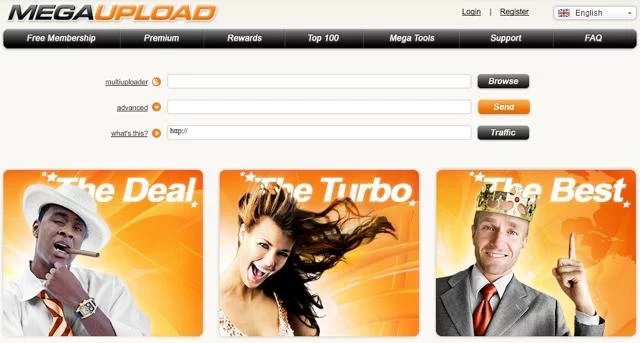
There was a time—not so long ago, though it sounds like digital prehistory—when saying “I’ll send you the file via Megaupload ” was as common as saying “I’ll leave it on Drive” is today. Megaupload was synonymous with sharing files easily, quickly, and without complications. Until one fine day in 2012, it vanished… leaving millions of users wondering, “What now?”
Since then, dozens (if not hundreds!) of online file-sharing alternatives have emerged. Some as simple as sending a link, others with encryption systems worthy of an intelligence agency. But they all have one thing in common: they seek to fill the gap left by Megaupload, adapting to an era where privacy, ease of use, and legality matter (a lot).
Why are we looking for alternatives to Megaupload in 2025?
Because we still need the same thing: to upload a large file and have someone else download it without it being a hassle. Whether it's sending a video to a client, sharing a photo folder, or sending documents that don't fit in an email.
But also because today we have new demands: we want it to be fast, secure, without unnecessary registration... and, if possible, free.
This post doesn't just provide a list of tools. We'll analyze them from real-life experience, so you know which one to choose based on your situation: whether you're a freelancer, whether you share with clients, whether you're concerned about privacy, or whether you just want to upload something without the hassle.
What Was Megaupload and Why Was It So Popular?
For nearly a decade, Megaupload reigned supreme in cloud file storage . Launched in 2005, it became the go-to solution for directly sharing large files until its closure in 2012. No complicated accounts, no complicated setup. You uploaded, got a link, sent it, and that was it.
It was the platform for sharing everything from personal documents to large amounts of multimedia content. The key to its success? Ease of use , free storage capacity (much greater than others at the time), and the fact that you didn't need to register or install anything to download.
In an era when email limited you to 25 MB per attachment (if you were lucky), Megaupload gave you up to 1 GB per file , free and without any catches. For many, it was a digital liberation.
But its rise also had its downsides. Megaupload was accused of massive copyright violations due to the uploading and distribution of unlicensed movies, music, and software. The case escalated to such a degree that, in 2012, the FBI abruptly shut it down and arrested its founder, Kim Dotcom. Millions of legal files were lost in the process.
The result? A generation of users orphaned by their favorite platform… and an urgent need for alternatives. Today, more than a decade later, we are still looking for tools that offer the same agility , but with a greater focus on legality, privacy, and sustainability.
What Should a Good Alternative to Megaupload Have?
If you're looking for a tool to upload, share, or store files and your point of comparison is Megaupload, the first thing to understand is what to expect from a good alternative . And no, it's not enough for it to "look similar." It has to surpass Megaupload in what really matters today: security, speed, accessibility, and legality.
Speed, storage, privacy… and more
A modern alternative to Megaupload should meet (at least) these requirements:
Decent upload and download speeds , even on free accounts. It shouldn't take 30 minutes to upload two PDFs.
Sufficient storage space : many offer from 2 GB to 20 GB for free. More than enough for basic use.
Privacy and encryption : Your files should be protected both during transfer and storage. End-to-end encryption (like that of pCloud or Mega.nz) is invaluable.
Link duration : the ability to control how long the file will be available or to set an access password.
Easy interface and no 200 ads per second : yes, we're talking to you, websites that look like they're from 2004.
Legality and reliability : forget about those dark platforms where you don't know if your files will end up being sold in some corner of the internet.
If the tool does all that, it's already in the good league. But if it also lets you preview files, sync with your phone, or work collaboratively , add it to your favorites!
Free vs. Premium: Do You Really Need to Pay?
Not necessarily. Many of the best alternatives offer quite generous free versions . Google Drive, for example, gives you 15 GB free. Mega.nz, 20 GB. MediaFire, a similar amount.
The important thing is not whether it's free or paid, but whether it solves your needs without compromising security or experience.
Now, if you use these platforms regularly for professional purposes, sharing large files, or maintaining constant backups, consider the paid versions. They're designed to give you more control, more space, and more features.
The Best Alternatives to Megaupload in 2025
I bring you a curated and updated selection of the best tools you can use today to upload, store, and share files online. Some are direct heirs to the Megaupload spirit, while others far surpass it in security, features, and professionalism.
1. Google Drive: ideal for collaborative environments
Google Drive is not only one of the most popular options, but also one of the most versatile. Perfect if you already use Gmail, Docs, or Sheets.
Free storage : 15 GB shared with other Google services .
Real-time collaboration and online document editing.
Access from any device with a flawless mobile app.
Ideal for : those who need more than just uploading and downloading files.
💬 The only "but"? It's not very efficient for sharing large files with people outside the Google environment.
2. WeTransfer: for file sharing without registration
Simple, straightforward, and hassle-free. WeTransfer is a gem for those who just want to send something quickly without opening accounts or struggling with interfaces.
Up to 3 GB of free monthly data transfer (no registration required).
Link valid for 3 days , then it will automatically delete.
Ideal for : designers, freelancers or creative teams who submit on-time deliveries.
💡 Tip: If you use it a lot, the Ultimate version allows for page customization and unlimited transfers.
3. pCloud: Swiss privacy with encryption included
pCloud has gained fans for its focus on security . Its servers are in Switzerland, and you can add optional end-to-end encryption.
10 GB free to start, expandable up to 20 GB with simple actions.
Automatic backup function from other platforms (Google Drive, Dropbox, etc.).
Desktop app with selective synchronization.
Ideal for : users who prioritize privacy and want total control.
🔒 Tip: pCloud Crypto (paid) encrypts files even before uploading them.
4. MediaFire: the most similar to Megaupload (but legal)
If you're looking for that fast, hassle-free experience with an old-school aesthetic, MediaFire is the closest thing to Megaupload you'll find... but with very clear legal terms.
10 GB free , expandable through referrals.
Direct upload from URL , no need to download beforehand.
Simple and unpretentious interface.
Ideal for : those who come from the old school of file sharing.
5. Mega.io: Yes, it's the "official" successor
Yes, it's the "child" of the legendary Megaupload, created by Kim Dotcom himself (although he's no longer at the helm). Mega.nz was born with a focus on privacy and generous storage.
20 GB free (and more if you complete missions).
End-to-end encryption by default.
Highly polished mobile and desktop applications.
Ideal for : those who want to securely share large files.
6. Dropbox: more professional, less flexible
Dropbox was a pioneer and remains a benchmark in the professional sector. It's not the most generous option in its free version, but it is one of the most stable and offers the best integration with work teams.
2 GB free , although you can expand it with shares or payment.
Advanced sharing with granular permissions.
Version history and file recovery.
Ideal for : businesses, agencies, developers and companies that need absolute reliability.
Consumer Relations Platform | Free Space | Link Duration | Privacy and Encryption | Ideal for… |
|---|---|---|---|---|
Google Drive | 15 GB | Unlimited (as long as the file exists) | Encryption in transit and at rest | Collaboration and teamwork |
3 GB | 3 days | No end-to-end encryption | Fast shipping without registration | |
pCloud | 10 GB (up to 20 GB with referrals) | Unlimited (free plan) | End-to-end encryption available | Users who prioritize privacy |
MediaFire | 10 GB | Unlimited | Basic, no extreme encryption | Those looking for something similar to Megaupload |
Mega.io | 20 GB | Variable according to use | End-to-end encryption | Users with a focus on privacy and storage |
Dropbox | 2 GB (up to 16 GB with referrals) | Unlimited (according to inactivity policy) | Encryption in transit and at rest | Companies and professionals |
Are These File Uploading Platforms Safe?
Okay, all these tools promise “security,” “privacy,” “encryption”… but can you really trust them? What exactly does it mean for a file to be “safe in the cloud”? Spoiler alert: not all clouds are created equal.
What you should demand from any alternative to Megaupload
Here's a short list of the minimum requirements for entrusting your files to any platform:
Encrypted connections (HTTPS) : This should be obvious, but always check that the website has a padlock icon and uses a secure protocol. If not, don't even think about uploading anything important.
Two-step authentication (2FA) : Enable it whenever available, especially if you're storing sensitive or personal documents.
Encryption at rest and in transit : Some services (like Mega or pCloud with Crypto) encrypt files even before they leave your computer. That's an extra point of peace of mind.
Activity history : Ideal for seeing who has accessed the system, when, and from where. Especially useful in shared projects or teamwork.
Permissions management : The ability to decide who can view, edit, or download files. Dropbox and Google Drive do this well.
Dangers if you choose “anything” out there
Don't be fooled by sites with names similar to the old ones (like the many "reloaded," "plus," or "clone" sites floating around). Many:
They do not have clear privacy policies.
They are hosted on servers of dubious origin.
They include intrusive advertising, unsafe scripts, or even malware.
💥 And yes, "free" can end up costing you dearly if you get hacked, lose your files, or get into legal trouble.
Basic cybersecurity recommendations for file sharing
Do not share public links to sensitive files.
Set expiration dates on links whenever possible.
Avoid uploading compressed files with weak passwords.
Don't just keep your backup in the cloud: use a local copy too.
Update your passwords frequently and avoid repeating them.
And remember: the weakest link in digital security isn't the software, it's the human . You decide what you upload, how, and where. The platform helps, but the responsibility starts with you.
What Is the Best Alternative According to Your Needs?
There's no single answer to the question "What's the best alternative to Megaupload?", because it all depends on your needs. So here's a practical mini-guide to help you choose the ideal tool based on your actual usage , not the hype of the week.
If you share files with clients
Recommendation: Google Drive or Dropbox
Why? Because they allow very detailed permission control (reading, editing, commenting), version history, and collaborative folder organization.
Ideal for: Freelancers, agencies, creative teams, web designers, consultants, etc.
Extra: You can add comments in real time, integrate with other tools (like Google Docs, Notion, or Slack), and control everything from your phone.
If you just want to send a quick file and run away
Recommendation: WeTransfer or TransferNow
Why? Because you don't need to register, the file uploads in seconds, and the recipient receives it with a temporary link. No drama, no bills, no hassle.
Ideal for: Sending a PDF, ZIP, or video on a one-time basis. Also for when you're in a hurry.
The downside? Links expire, and you don't have much control over whether you want to access them later.
If you prioritize privacy and extreme encryption
Recommendation: Mega.io or pCloud (with Crypto)
Why? Because they encrypt files end-to-end and allow you to control who accesses them and for how long.
Ideal for: Personal files, sensitive documentation, private backups or sending confidential material.
Pro tip: With Mega you can even create encrypted shared folders, and with pCloud you can have a “Crypto Folder” that can only be accessed with a password.
If you need a lot of free space
Recommendation: Mega.io (20 GB), MediaFire (10 GB), pCloud (10 GB)
Why? Because they offer generous storage even without paying.
Ideal for: Those who can't or don't want to pay yet, but need space to get started.
If you are more technical or need APIs and integrations
Recommendation: Dropbox or Google Drive
Why? Because both have powerful APIs and integrate with thousands of apps and automated workflows (like Zapier, Make, or n8n).
Ideal for: Development teams, automation teams, or companies that use complex processes in the cloud.
Purpose | Recommended Tool | Free / Premium | Privacy policy | Easy to use |
|---|---|---|---|---|
Share large files easily | WeTransfer | Free (limited) / Premium | Media (unencrypted) | Very high |
Collaborative work in the cloud | Google Drive | Free (15GB) / Premium | Media (Google accesses the data) | High |
Maximum privacy and encryption | pCloud | Free (10GB) / Premium | High (end-to-end encryption) | High |
Professional document management | Dropbox | Free (2GB) / Premium | Medium-High (enterprise encryption options) | Media |
Fast transfers without registration | MediaFire | Free (10GB) / Premium | Low-Medium (no real encryption) | High |
FAQ
Good question. And the short answer is: yes, as long as the content you upload is of yours or have the rights to share it.
Most of these platforms (Google Drive, Dropbox, WeTransfer...) have very strict policies against piracy, copyrighted content, or any type of illegal material. If you do this, they can block your account, delete your files or even report you to the authorities, depending on the case.
✅ Tip: Use these platforms to share work files, creative content, courses you've created, documents, graphics, etc. Not for uploading movies, pirated software, or ebooks with broken DRM. It's not worth the risk.

Here's a quick rundown of the best current options:
| Consumer Relations Platform | Free space |
|---|---|
| mega.nz | 20 GB (expandable by tasks) |
| pCloud | 10 GB (you can add up to 20 GB with referrals) |
| MediaFire | 10 GB |
| Google Drive | 15 GB shared with Gmail and Google Photos |
| Dropbox | 2 GB |
📌 Note: Some limits may vary if there are active promotions or policy changes.
If you're looking for convenience on your mobile device , these are our favorites:
Google Drive: Fast, intuitive, perfect for Android users.
Dropbox: Very stable and with flawless synchronization.
Mega.io: Ideal for mobile encryption and automatic backup of photos and videos.
pCloud: Very visual, good performance, although somewhat more limited without a premium account.
🧠 Extra tip: If you work from your mobile device, enable automatic photo upload to your cloud to avoid any surprises if you lose your phone.
Conclusion
Alternatives to Megaupload not only exist, but many far surpass it. We've gone from a wild internet of massive downloads to a much more organized, functional, and (yes, also) legal web.
And while we're no longer living in the golden age of "forum-sharing movies," today you have a range of tools to send, save, or share files professionally, securely, and tailored to your needs.
It's not just about finding an alternative to Megaupload , but about choosing the one that best suits your way of working :
Do you want privacy? → pCloud or Mega.
Speed without registration? → WeTransfer.
Integration with your digital business? → Google Drive or Dropbox.
So now that you know what options you have, choose wisely and don't rely on platforms that disappear overnight.