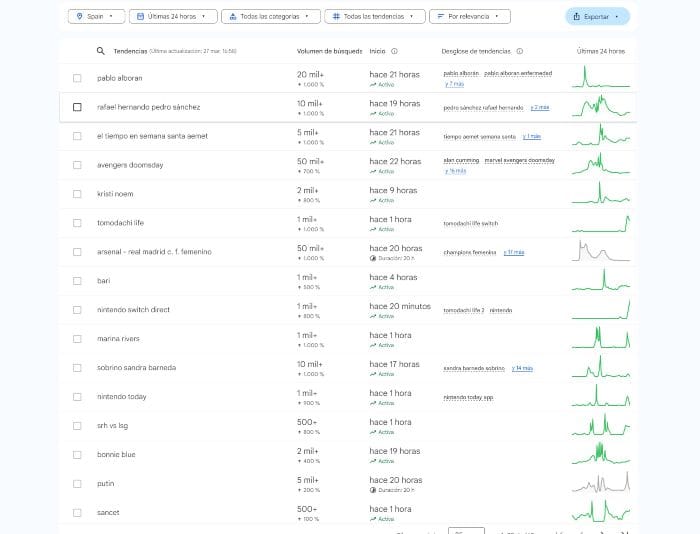
Without it, you're just shooting in the dark. With it, you know exactly what your audience is looking for, how they're looking, and how to get them straight to your website. Here we'll break down the process and show you step by step how to do professional keyword research, with examples, tables, templates, and tons of practical tips. Ready? Let's get started.
Why is Keyword Research the Pillar of SEO?
What exactly is keyword research?
Keyword research is the process of finding and analyzing the terms that people actually type into search engines like Google when they want to resolve a doubt, search for a product, find information, or buy something.
We're not just talking about "isolated words" like clothes , shoes , marketing , but about complete, specific, and intentional phrases, such as:
Those little gems that reveal exactly what your audience needs. And if you know them well, you can create content that fits like a glove.
Why can't you do SEO without good keyword research?
If SEO were a building, keyword research would be the architect's blueprint. You can build without a blueprint, of course, but you'll probably end up with a crooked house, leaking, without windows, and very difficult to find on Google.
Here are some reasons why it's essential to do keyword research before you start writing or designing a SEO strategy:
You avoid creating content that no one is searching for.
You attract quality traffic : not just any traffic, but the traffic that really interests you.
You identify opportunities to position yourself more easily or with less competition.
It helps you structure your website and create categories, menus, and content designed for the user.
You improve conversion by aligning what you offer with what your ideal customer is looking for.
👉 Keyword research = write less and rank more.
Step 1: Understand Your Audience and Their Intentions
Before opening any SEO tool , it's time to put on your detective hat and analyze the protagonist of all this: the user.
The key is in the search intent
A keyword only makes sense if it's aligned with the type of customer you want to attract. That's why it's so important to understand:
What does your user need?
What worries you?
What stage of the buying process are you in?
What language do you use when you search on Google?
And all this without making assumptions. You have to observe, ask questions, and analyze.
In SEO, not all keywords are created equal. Each one responds to a different user intent, and that influences how you should approach your content.
Informative intention 🧠 The user wants to know something. Example: how to do keyword research. Ideal for: blogs, guides, tutorials.
Transactional intent (I.e. The user wants to buy, hire, or do something. Example: best SEO tool for ecommerce. Ideal for: product pages, sales landing pages, comparisons.
Navigational intent 🧭 The user wants to find a specific page. Example: Ubersuggest login. Ideal for: brand positioning or branded SEO.
Local intention 📍 The user is searching for something in their area. Example: SEO agency in Valencia. Ideal for: local businesses, Google Maps, company profiles.
Type of intention
Search example
What does the user want?
Policy
“how to plant a lemon tree”
Learning
transactional
"buy Nike sneakers"
Add to Cart
Navigational
“sign in to Gmail”
Reach a specific website
Local News
“tattoo artist in Granada”
Find a business nearby
👉 Identifying the correct intent behind each keyword is what allows you to create the perfect content to answer it.
How to detect the “pain point” behind a search
Behind every search lies a real need. A doubt, a problem, a curiosity, an urgency.
For example:
" Fast WordPress website template " → Pain: My website loads slowly and I want to improve it.
"How to make bread without yeast" → Pain: I don't have yeast but I want to make bread.
"Best WordPress SEO plugins 2025" → Pain: I want to rank but I don't know which plugin will help me best.
👉 Identifying the "pain point" is key to truly connecting with your readers, and not just ranking, but also converting them.
📌 Helpful tip : Browse Reddit, Quora, or TikTok and see how people phrase their problems. They're goldmines for finding real keywords that don't (yet) appear in the tools.
Step 2: Brainstorming and Initial Keywords
Now, let's get out our pen and paper... or Google Docs.
Before diving headfirst into tools like Semrush, Ubersuggest, or Keyword Planner, you need to do one basic thing (but one that many skip): think for yourself.
Yes, do a manual brainstorming session , without filters, using pen and paper or an open Excel spreadsheet. This stage is so important because it helps you connect the knowledge you have about your business or project with what people might be searching for on Google.
How to get started without tools (just common sense and observation)
Ask yourself things like:
What product or service do I offer?
What problem does it solve?
What frequently asked questions do my clients ask me?
How would you search for this content if you didn't know anything about it?
What variations are there of that term?
For example, if your business is an online cooking school, your brainstorming might include:
easy recipes
cooking course for beginners
how to learn to cook
online cooking school
basic cooking techniques
quick healthy recipes
➡️ Practical tip: Talk to your customers . Ask them how they found your website or what they would search for on Google. Sometimes the best keyword research happens in a WhatsApp message or an informal conversation.
👉 This phase is more powerful than it seems.
Use your own website as a starting point
Here's a technique I love and use constantly at Zudro Digital Media : exploring your own digital assets to find keyword ideas. In other words:
Read the titles of your posts.
Review the services you offer.
Look at your products, your FAQs, your social networks.
Review your analytics ( Google Search Console , for example) to see what you're already ranking for without realizing it.
With that, you can build a map of keywords that already have a natural connection with your content.
Also think about synonyms, variations and colloquial expressions.
This is key if you write in Spanish. For example, "computer" in Spain is "computadora" in Latin America. "Online store" can also be "ecommerce," "digital business," "electronic commerce."
👉 Don't stick to just one way of saying something. Google is increasingly semantic, and the more natural ways you find for a search, the richer your strategy will be.
After the creative brainstorming phase, it's time to validate your ideas, discover new opportunities, and quantify everything you've come up with. For that, we need keyword research tools . And luckily, there are options for all tastes, budgets, and experience levels.
Free tools (yes, you can get started without paying anything)
Here are some that work VERY well to get you started:
Tools
What is?
main advantages
Google Suggest
Google Autocomplete with real ideas
Free, direct from Google, current ideas
Google Trends
See the evolution and seasonality of terms
You detect trends before others
AnswerThePublic
Find real questions people ask
Brutal for blog-type content
Google Keyword Planner
Search volume, competition, and CPC estimates
Google Ads real data
Keyword Surfer (Chrome extension)
Displays real-time volumes while browsing Google
Super fast and without leaving the search engine
Paid Tools: If You're Serious About SEO
If you have a professional blog, an online store, or want to compete in a highly competitive sector, these tools are an investment, not an expense:
Ideal for backlinks, but also excellent for keyword research
From €99/month
Ubersuggest
More accessible, perfect for getting started (and has an app)
From €49/month
SE Ranking
A hidden gem: very complete, very visual and with useful tools for Local SEO
From 47.20 € / month
KeywordTool.io
Very powerful for suggestions and long tail
From €69/month
➡️ Zudro Digital Media Tip : If you're just starting out, don't overwhelm yourself with 4 tools. Choose one free one + one paid one (if you can) and use them to their full potential.
Which one do I choose according to my case?
Do you have a personal blog with no income? → Google Suggest + Keyword Planner.
Do you have an online store and sell daily? → Ubersuggest + Semrush or Ahrefs.
Want to do local SEO? → SE Ranking + Google Trends.
Does your content rely on frequently asked questions? → AnswerThePublic is your best friend.
👉 What's next? Once you have a good list of keywords, it's time to analyze them in depth: How often are they searched? How much competition do they have? Is it worth targeting that keyword, or are there better ones?
For that, we go straight to the next step:
Step 4: Analyze Volume, Competition and Opportunities
You already have a list of keywords… but they're not all equal! Some have thousands of searches, others very few. Some are highly competitive, others are forgotten (and that's where the treasure lies 🏴☠️). This is where you need to separate the gold from the mud.
What metrics should you take into account?
When analyzing keywords, these are the 4 key metrics you should keep an eye on:
Metric
What does it measure?
Why Is This Important?
Search volume
How many times a month is that keyword searched on Google?
More volume = more traffic potential
Difficulty (or KD)
How difficult is it to rank for that keyword?
High difficulty = you need more authority to rank
CPC (Cost per click)
How much advertisers are willing to pay for a click on that keyword
A high CPC usually indicates purchase intent and high economic value.
Trend
Whether search is growing, declining, or stagnating over time
Growing words = future opportunity
How to detect long-tail, low-competition keywords
Long tail keywords are more specific phrases , with less volume, but which bring in highly qualified users.
Example:
🟥 “sneakers” → 90.000 searches, very high competition.
These keywords are perfect for blogs, niche stores, and websites that don't have huge authority (yet).
🔎 Tools to help you find them:
KeywordTool.io (free or pro version)
AnswerThePublic
Google Autosuggest (start typing and see the suggestions)
Semrush → Keyword Magic Tool
Keyword Gap: Discover the keywords your competitors are using
A super powerful (and underutilized) feature is the ability to detect which keywords your competitors are ranking for that you aren't . This is called the Keyword Gap.
👉 You can do this with:
Semrush → Keyword Gap Tool
Ahrefs → Content Gap
Ubersuggest → Competitor Analysis
💥 Practical example:
Your website sells aromatherapy products.
Your competitor appears on Google with “non-toxic scented candles”… you don’t.
That keyword is a missed opportunity… and you know what happens next!
Which keywords to choose?
You shouldn't always go for the one with the highest volume. Ideally, you should find a balance between volume, intent, and reasonable competition.
Criteria for choosing a winning keyword:
✅ It has at least 100 monthly searches (if it's long tail, even 30-50 may be worth it). ✅ The intention is aligned with what you offer. ✅ It doesn't have an unattainable SEO difficulty for your website. ✅ It has conversion or recurring traffic potential.
Step 5: Classify and Group Your Keywords (Clusters and Actual Content Strategy)
This is where your website's SEO architecture is defined . What now seems like an endless list of words becomes logical clusters that will shape your categories, articles, landing pages, or even menus.
Sort by Search Intent
Before grouping, you need to understand what the user wants when searching for each keyword.
Here are the 4 main types of intention :
Intention
What the user is looking for
Examples of keywords
Policy
Want to learn, resolve a doubt
“What is intermittent fasting?”, “How to make homemade bread.”
transactional
Want to buy or hire something?
“buy women's running shoes”, “SEO agency Granada”
Navigational
Search for a specific website or brand
“Netflix”, “Amazon login”, “Zudro Digital Media”
Local News
Want to find something near your location?
“vegan cafes in Granada”, “hair salon near me”
🎯 Pro tip: Use a column in your Excel/Notion to categorize each keyword by intent. This way you'll know what type of content each group needs.
Create Topic Clusters
The next step is to group your keywords by related topics . This allows you to:
Create a clear structure for your website.
Boost internal SEO with contextual links.
Avoid cannibalization (when multiple URLs compete for the same keyword).
¿Cómo hacerlo?
Think of your website as a tree:
The trunk is a main theme (a category, a service, a landing page).
Branches are related content that expands it (posts, subpages, resources).
Buyer persona or segment : e.g., “business owners”, “entrepreneurs”, “designers”.
Geographic location : if you do local SEO, this is key.
✅ When you finish this step you should have:
An Excel (or visual table) with tabs or colors for each cluster.
A clear idea of what content to create.
A logical hierarchy for your blog/website.
Future ideas on interlinking and SEO architecture.
🎯 Golden tip: Don't start creating content without first grouping. If you do it the other way around, you'll end up with three competing posts, duplicate titles, and no clear strategy. SEO's the word.
Step 6: What to Do with Your Keywords
Here I explain how to use your keywords effectively so they work in your favor and not just decorate a text.
How to use keywords in your content (without forcing them)
No, it's not about repeating a keyword 17 times per paragraph like a parrot. That technique, besides sounding awful, is penalized by Google (and by your readers).
Here's a handy little guide:
Where to use the main keyword
What to keep in mind
Title (H1)
It should include the keyword, but sound natural and attractive.
URL
The shorter and clearer, the better. Include the keyword without prepositions. E.g.: /create-online-store
First paragraph
Enter the topic and keyword without forcing it.
Subtitles (H2, H3…)
They help reinforce the semantic structure.
ALT text for images
Use the keyword if it describes the image well.
Meta title and meta description
Very important for the CTR!
(I.e. Secondary keyword and synonyms: Don't obsess over repeating the exact same thing. Use natural variants, synonyms, and long tails. Google already understands semantics.
On-Page SEO: Where to Place Keywords Strategically
Think of your content as a conversation between you and Google. You need to leave clear clues so it understands:
What is your page about?
What value does it offer?
Who is it for?
These are “hot” areas to strengthen SEO:
Slug : /how-to-do-a-keyword-research
H1 : Step-by-Step Guide to Effective Keyword Research
First 100 words : “If you want to rank your website, learning how to do keyword research is the first step…”
Featured image ALT tag : “keyword-research-herramientas.png”
H2/H3 tags : Use keywords or variants in the subheadings.
Internal anchor text : When linking to other content, use meaningful text that includes related keywords or topics.
🧠 Beware of keyword stuffing Repeating for the sake of repeating is counterproductive. Use synonyms, rephrasing, and address search intent.
How to prioritize which keywords to target first
This is where strategic criteria come into play.
Not all keywords deserve your energy right from the start. Learn to choose battles you can win. And to do that, consider:
Criterion
Example or sign
Low competition
Few websites positioned or weak content
Decent volume
It doesn't have to have 10 searches. 100-300 can be great if it's very specific.
Good conversion
It has sales or acquisition potential. E.g., "best CRM for lawyers."
Link to your service/product
Directly related to what you offer.
Ability to respond well
Can you create the best content on that topic? Then go for it.
(I.e. Combine top keywords with long tails: Targeting long-tail keywords first often yields better results initially. They're more specific, have less competition, and rank faster.
Step 7: Common Mistakes When Doing Keyword Research
If you're reading this, you've probably taken your keyword research seriously. But even so, there are very common mistakes that can knock you out of the game before you even begin. And it's not because you're a beginner: even experienced SEOs fall into these traps.
Here I detail them one by one with real examples and tips to avoid them.
❌ 1. Obsessing only over search volume
This is the classic beginner's mistake: only searching for keywords with thousands of searches per month and forgetting whether they are useful or if you can rank for them.
🔍 Real example:
Keyword: “shoes”
Volume: 50.000 monthly searches
Difficulty: Very High
Intent: Ambiguous (Buy? See images? History of footwear?)
Result: lots of traffic… zero conversions.
✅ What to do instead: Look for more specific keywords with clear intent. “Leather shoes made in Spain” has less volume, but converts better and ranks more easily.
❌ 2. Ignoring search intent
It doesn't matter how beautiful your keyword is if you don't understand what the user really wants when they type it.
💡 Do you inform? Do you buy? Do you compare? Do you research? If you don't get the intent right, you won't rank.
🔍 Example:
Keyword: “best CRM”
If you make a product sheet… it’s no good.
What the user wants is a comparator, a list, a guide.
✅ How to avoid it: Before creating content, search for that keyword on Google and analyze the first 10 results. What format are they in? What do they answer? Are there videos, lists, fact sheets, articles?
❌ 3. Choose keywords that are impossible to rank for (for now)
Going after keywords dominated by media giants or portals with millions of links is like playing in the Champions League without a team.
🔍 Example:
Keyword: “web hosting”
Top results: Hostinger, SiteGround, GoDaddy, Ionos…
Unless you have absolute authority, it's best to look for long-tail variations :
❌ 4. Not reviewing what you have already positioned
If you already have content that's working, why create something new to compete with it?
🔍 Common mistake: Creating two articles for the same keyword without realizing it. Result: SEO cannibalization.
✅ What to do:
Check Google Search Console → Performance Report → Filter by Page → See which keywords each URL is already ranking for.
If you detect cannibalization, merge content or redefine intentions.
❌ 5. Choosing keywords that don't align with your business
Some people find a juicy keyword, create content, rank for it... but it doesn't add anything to their brand.
🔍 Example:
You have a vegan products store.
Keyword: “cheesecake recipes”
Good volume, good competition… but you don’t sell cheese.
✅ Solution:
Find the balance between opportunity and brand consistency.
“No-bake vegan cheesecake” would make more sense.
❌ 6. Do keyword research once and forget about it
Your market changes. Searches change. Google changes. You should too.
✅ Review your keyword research every 3-6 months , especially if:
Your visits have decreased.
Your product or service has changed.
A new strong competitor enters.
You want to scale your positioning.
Common mistake
Why is a problem
How to avoid it
Only search for high volume
Irrelevant traffic and high competition
Volume-intention-opportunity balance
Not looking at search intent
The content does not respond to what Google expects
Analyze the SERP before creating content
Attack impossible keywords
Waste of resources
Prioritize long tails or less competitive keywords
Ignore already ranked content
Cannibalization and loss of ranking
Use Search Console to audit your pages
Keyword that does not connect with your business
You attract users who don't convert
Choose words aligned with your audience
Do it only once
You become outdated
Review keyword research periodically
🧠 Final tip: Don't be afraid to make mistakes. We've all published content that doesn't rank or convert. The important thing is to quickly identify why and adjust your strategy.
You already know the key steps for conducting professional keyword research, but what if you could take it a step further? Here's an arsenal of additional tools, templates, and resources that will help you improve your workflow, save time, and better organize your strategy.
Chrome Extensions
These extensions will allow you to quickly obtain valuable data without leaving your browser. Ideal for quick analysis or when you're spying on the competition 👀
Extension
What is?
Ideal for…
Keyword surfer
Displays search volume, related keywords, and traffic estimates directly in Google results.
Brainstorming and rapid analysis of SERPs.
MozBar
It lets you see domain and page authority, link count, and more, without leaving Google.
Evaluate competition directly from the search engine.
Minion SEO
Analyze pages (titles, headings, links), find broken links, and more.
Quick audits of pages that are already ranking.
Templates to Organize Your Keyword Research
It's not enough to have ideas or tools; you need structure. Here are some examples of how you can manage your keyword research like a pro:
Kanban boards to organize keywords by stages (analyzed, chosen, written, published).
Notion
Cluster template
Visual map with the main keyword and all related long tail keywords.
Miro / Whimsical / FigJam
💡 Bonus idea : If you have a team, share these templates so everyone works with the same criteria.
Other resources worth exploring
Google Trends : to see the interest in a keyword over time.
Reddit and Quora : inexhaustible sources of real questions people ask.
Competitor pages : get inspired by their top-ranked content, but take the topic a step further.
YouTube autosuggest : to find ideas in video format that are not yet well covered in blogs.
💡 Zudro Digital Media Tip: “Make your keyword research an ongoing process, not a one-time task.” Searches change, trends evolve, and so does user behavior. Dedicate at least a monthly review to fine-tune your strategy and stay competitive.
Frequently Asked Questions about Keyword Research
Here we answer those questions that often arise, whether you're just starting out or have been doing SEO for a while. And yes, some are more common than you think 😉
How often should I update my keyword research?
Even if you've done brilliant keyword research, it's not something you can just leave in a drawer for a year . Ideally, you should review it every:
3 months , if you are in a very changing or trending sector.
6 months , for stable businesses but with strong competition.
At least once a year to ensure your content continues to answer relevant searches.
💡 Zudro Digital Media Tip : Mark a quarterly review of your keyword strategy on your calendar. Align it with your Analytics and Search Console reviews to maximize insights.
What do I do if my keyword has a lot of volume but also a lot of competition?
This is one of the most typical situations. While high volume can be tempting, high competition can leave you out of the running if you don't have enough authority.
👉 Smart alternatives:
Look for long-tail variants with a more specific intention.
Create a content cluster that reinforces that main keyword from different perspectives.
Work on link building and EEAT to increase your authority before trying to rank for that keyword.
📌 Real example : instead of trying to rank for “trips to Japan” (brutal volume and fierce competition), try “travel to Japan in October” or “what to pack for Japan”.
Can I rank without keyword research?
The short answer: yes. The long answer: but you shouldn't.
You may get lucky and find content that ranks for its informative value. But keyword research is like using a map before embarking on a journey. It saves you time, resources, and errors, and, above all, it points you in the right direction.
🧠 And remember: keyword research isn't just for ranking. It's for better understanding what your audience is looking for, needs, and expects to find.
Conclusion
If you've made it this far, you already understand that keyword research isn't just another task in SEO. It's the fundamental pillar upon which successful strategies are built.
Good keyword research isn't just about finding words with high search volume. It's about understanding your audience , their intentions, their questions, their actual searches… and translating all of that into useful, well-organized, and optimized content.
Quick summary of what we learned:
Understand your audience : don't just focus on what you want to say, think about what they need to read.
Brainstorm : Before touching any tools, use your logic and empathy.
Use free and paid tools : you don't need to spend a fortune to get started, but you do need to know how to use them.
Analyze with discernment : not all words with volume are worth your effort.
Group and organize : structure your strategy so that your website has semantic coherence.
Write for humans, optimize for search engines : find that balance.
Why should you take this part of SEO very seriously?
Because without solid keyword research, you'll be sailing blind. And if you do it right, you'll not only attract more visitors... but the right ones. Those who convert, who recommend you, who come back.
💡 A well-chosen keyword can generate more revenue than a thousand unintentional visits.
Next steps to put it into practice today:
Create a new document (it can be a Google Sheet or Notion) with your initial list of ideas.
Do a first scan on Google Suggest and Trends.
Try it on your blog or services page. Don't wait until everything is perfect. Optimization will come later.
💬 Do you have questions about your keyword strategy? Leave us a comment or send us a message. At Zudro Digital Media, we help you build a website that not only looks great but also ranks well.
Table of Contents
Share me on your social media
Best Hosting in Spain
Best VPS in Spain
Maria de Mora
Digital Marketing is my life. I specialize in web design and development with WordPress and online advertising. I'm passionate about automation and AI, in all its wide variety. I'm constantly improving my skills and love learning new areas and improving my skills in familiar ones. Day after day, I help companies and freelancers take their businesses to the top. Want to be one of them? Get in touch with me. A lifelong student, I'm currently pursuing a Double Degree in Business Administration and Computer Engineering from the UOC.